
Changes in version 2.0.0:
As of October 2026, Microsoft Fabric Runtime 2.0 is used by default in Fabric. Fabric Connector v2.0.0 is required for this Runtime, as older versions are not supported on Microsoft Fabric Runtime 2.0.
Follow the steps below to start using Microsoft Fabric Runtime 2.0. You need to upgrade to Runtime 2.0 before March 31, 2027. After this date, Microsoft will no longer support Microsoft Fabric Runtime 1.3.
Configure in the workspace (for manual notebook runs):
- In Fabric, go to Workspaces and open the workspace containing the notebooks.
- Click Workspace settings in the top-right corner.
- Under Data Engineering/Science, select Spark settings.
- Go to the Environment tab and select Runtime version 2.0 (Spark 4.1, Delta 4.2).
- Click Save.
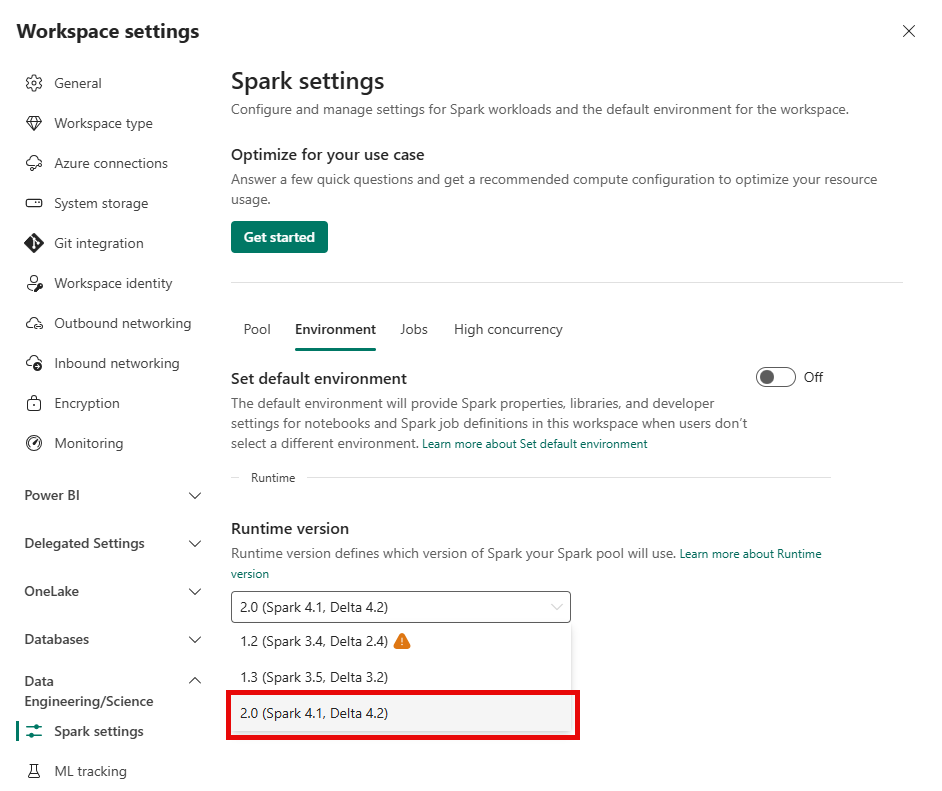
Configure in the environment (for scheduled notebook runs):
When you use an Environment to make the Fabric Connector available to your notebooks, Runtime 2.0 must also be configured in the Environment.
- Go to the Fabric workspace and open the Environment.
- At the top, change the Runtime version to 2.0 (Spark 4.1, Delta 4.2).
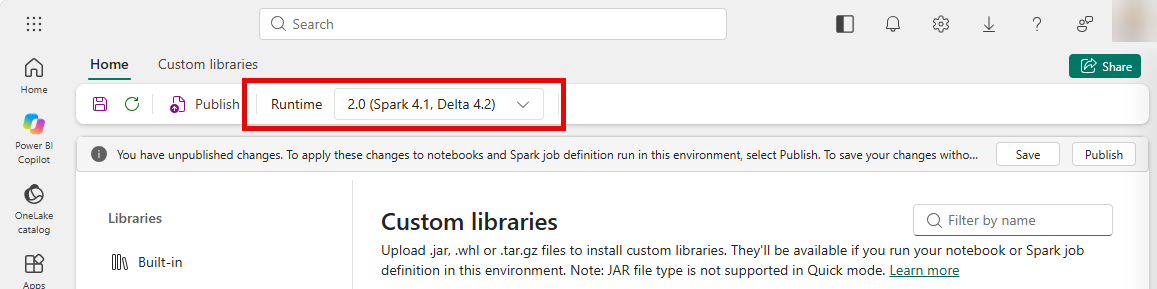
- Make sure that Fabric Connector v2.0.0 is also loaded on the Custom tab (see the instructions under Updating the connector).
- Click Save in the top-right corner.
- Then click Publish and follow the steps on the screen.
Publishing an Environment can take about 5 minutes. Wait until the publishing process is fully completed before continuing with running a notebook.